Building AI Agents from Scratch (Part 3): Choosing Your Weapons — Mainstream Frameworks Comparison & LangGraph Practice
[TL;DR / Core Concept] Why do we need Agent frameworks? While hand-rolling a ReAct loop in pure Python (as we did in Part 2) is excellent for understanding the underlying mechanics, production environments demand much more. To build enterprise-grade agents, you need state management (Memory), error recovery, cyclic control flows, and observability. Modern frameworks provide the necessary infrastructure to scale your agents from fragile prototypes to resilient digital workers.
Welcome to Part 3 of the “Building AI Agents from Scratch” series. Now that we have stripped away the magic and mastered the raw ReAct I/O logic, it is time to choose our weapons for production. Today, we will compare the top AI agent frameworks of 2026 and dive deep into LangGraph to refactor our agent with robust state management.
1. The 2026 AI Agent Framework Landscape
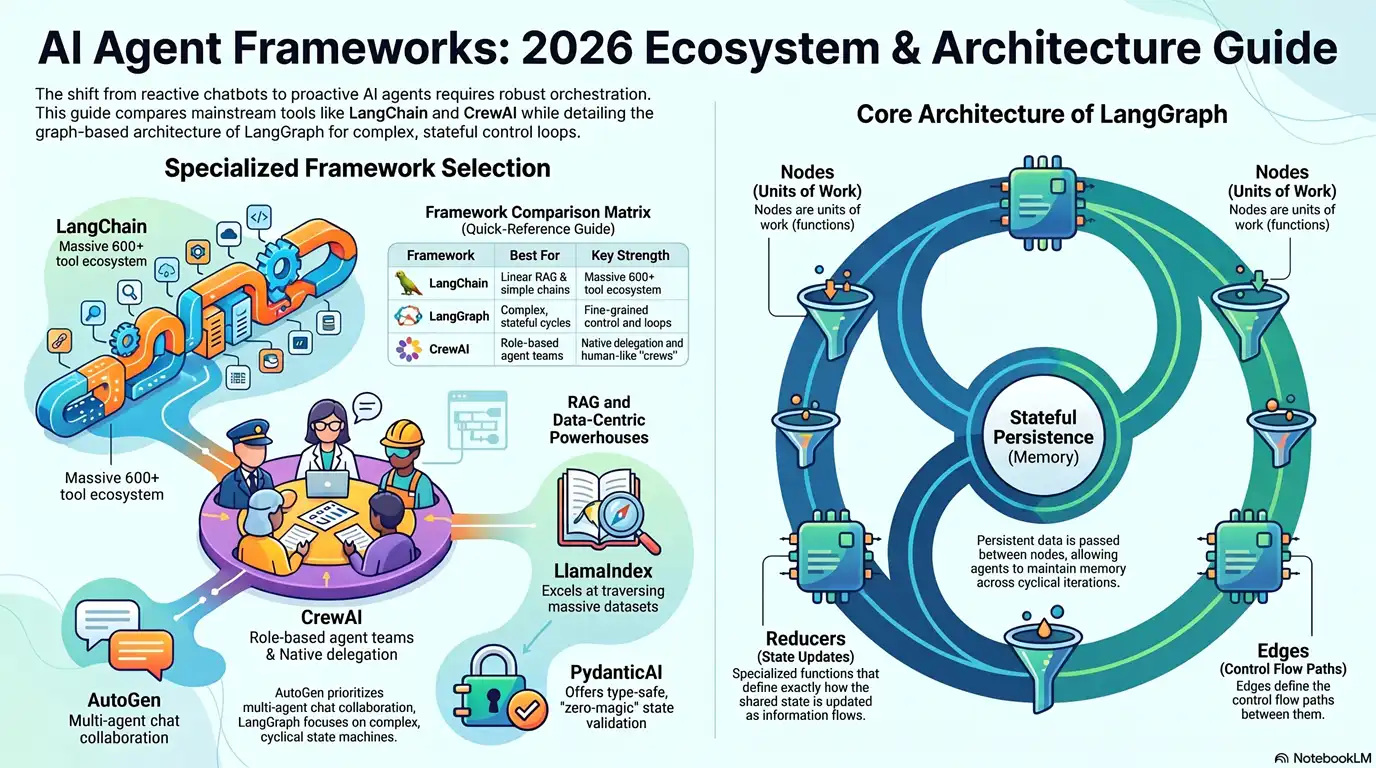
The shift from 2025 to 2026 marked a transition from merely proving an agent can be built to ensuring it withstands the demands of production. Different frameworks optimize for different architectural paradigms. Here is the ultimate decision guide for modern engineering teams:
| Framework | Core Paradigm | Best Use Case | Strengths & Characteristics |
|---|---|---|---|
| LangChain | Linear Sequences / Chains | General-purpose and prototyping | The foundational ecosystem giant with over 600 integrations. Excellent for linear tasks but can suffer from abstraction complexity in non-linear workflows. |
| LangGraph | Directed Acyclic Graph (DAG) / Cyclic FSM | Complex, stateful agents & control loops | Built for stateful workflows. Allows developers to define flows as nodes and edges, supporting cyclical loops and human-in-the-loop approvals. |
| CrewAI | Role-based Multi-Agent | Collaborative agent teams | Modeled after human organizations. You define agents with specific roles, goals, and backstories to tackle sequential or hierarchical tasks. |
| AutoGen | Conversational Agents | Code execution & iteration | Microsoft’s framework where agents converse to solve problems. Exceptional for coding tasks where an agent writes code, another verifies it, and they iterate upon errors. |
| LlamaIndex | Query-driven State Routing | Data-centric RAG agents | Treats data sources as first-class citizens. The premier choice for reasoning over massive private document collections via advanced indexing and router agents. |
| PydanticAI | Type-safe State Validation | Strict, production-grade agents | Prioritizes reliability and code quality over “magic”. Forces upfront data schemas, ensuring outputs strictly match system requirements (e.g., triggering bank transactions). |
| Semantic Kernel | SDK Integration | Enterprise App Integration | Microsoft’s SDK designed to integrate AI into existing enterprise apps, offering first-class support for .NET, Java, and Python. |
Architect’s Takeaway: Do not fall into the trap of looking for “one framework to rule them all.” As noted in enterprise deployments, you might use CrewAI to design the agent personas, but orchestrate their execution using LangGraph for ultimate state control.
2. Why LangGraph is Winning the Production Battle
If you are building an agent that needs to safely interact with a database, retry upon failure, or pause for human approval, you need an architecture that supports cyclical control flows. This is where LangGraph shines.
LangGraph treats your agent’s workflow as a state machine. It is built on four core components:
- State: The persistent, global data structure passed between steps.
- Nodes: The actual units of work (e.g., an LLM generating a thought, or a Python function executing a tool).
- Edges: The conditional logic that defines the path between nodes (e.g., “If the LLM calls a tool, route to the Tool Node; otherwise, route to END”).
- Reducers: Functions that define exactly how the global state is updated after a node finishes its work.
Case Study: Lyft’s Production Architecture
To understand LangGraph’s enterprise power, look at Lyft. By 2026, Lyft migrated its customer support operations to a multi-agent system built on LangGraph. They implemented a Router Multi-Agent Pattern: a meta-agent acts as a stateful router, dynamically dispatching user requests to specialized subagents (like a “damage claim agent” or “ride earnings agent”).
Crucially, Lyft utilizes a custom DynamoDBSaver that implements LangGraph’s checkpointing interface. This provides a durable state across multi-turn conversations, enabling the agent to maintain context, recover from mid-conversation interruptions, and safely replay executions.
3. Hands-on Practice: Refactoring our ReAct Agent with LangGraph
Let’s upgrade the pure Python while loop from Part 2 into a robust, stateful LangGraph application.
Step 1: Define the State
Instead of a simple list of messages, we define a structured State that will be passed between our nodes.
from typing import TypedDict, Annotated
from langgraph.graph.message import add_messages

class MessagesState(TypedDict):
    # 'add_messages' is a reducer that appends new messages to the existing state list
    messages: Annotated[list, add_messages]
Step 2: Define the Nodes (The Workers) We need two primary nodes: one for the LLM’s reasoning, and one for executing tools.
def call_llm(state: MessagesState):
    """Node 1: The Brain. Evaluates the state and decides next steps."""
    messages = state['messages']
    response = llm_with_tools.invoke(messages)
    return {"messages": [response]} # Updates state

def call_tool(state: MessagesState):
    """Node 2: The Hands. Executes the tool requested by the LLM."""
    # (Implementation logic to map the tool call to the actual Python function)
    # Returns the Observation back into the state
    return {"messages": [tool_message]}
Step 3: Define the Edges (The Router) How does the graph know when to stop or when to use a tool? We define a conditional routing function.
def should_continue(state: MessagesState):
    """The conditional edge logic."""
    last_message = state['messages'][-1]

    # If the LLM requested a tool, route to the 'action' node
    if last_message.tool_calls:
        return "action"
    # Otherwise, the task is complete
    return "end"
Step 4: Compile the Graph Finally, we wire the nodes and edges together to create our stateful application.
from langgraph.graph import StateGraph, END

# Initialize the graph with our State schema
workflow = StateGraph(MessagesState)

# Add our nodes
workflow.add_node("agent", call_llm)
workflow.add_node("action", call_tool)

# Define the entry point
workflow.set_entry_point("agent")

# Add conditional edges from the 'agent' node
workflow.add_conditional_edges(
    "agent",
    should_continue,
    {
        "action": "action",
        "end": END
    }
)

# After an action is completed, always return to the agent to observe and reason again
workflow.add_edge("action", "agent")

# Compile into a runnable application
app = workflow.compile()
By compiling this graph, we successfully replace our fragile while True: loop with a highly deterministic, state-managed execution flow. If a tool fails, the graph can be programmed to retry; if the workflow requires human approval (like issuing a refund), we can easily add a “Human-in-the-loop” breakpoint right before the action node.
Frequently Asked Questions (FAQ)
Q: Should I completely avoid LangChain/LangGraph if I’m just starting out? A: Not necessarily. While hand-rolling agents (Part 2) is best for learning, LangChain is the default starting point for Python developers because of its massive ecosystem and tutorials. However, avoid forcing your logic into rigid abstractions. Use simple prompt chaining first, and adopt LangGraph only when your workflow demands branching, loops, or complex state persistence.
Q: Can I use different models for different nodes in LangGraph? A: Absolutely! This is known as the “Plan and Execute” pattern. You can use a highly capable (and expensive) model like GPT-4o for the “Planning Node”, and route the execution of sub-tasks to faster, cheaper models like Llama-3-8B.
📢 Preview for the Next Article Now that our agent has a robust framework and state management, how do we make it truly productive? In “Part 4: From Atoms to Business Loops — Building and Using Agent Skills,” we will package atomic tools into reusable business skills and use semantic retrieval for dynamic skill routing.